Monday, May 19, 2014

Reduce Microphone Background Noise in Windows 7


 Reduce Microphone Background Noise in Windows 7
Step 1: Plug in your microphone

 Step 2. Go to your Windows Start button.

Step 3. Go to Control Panel.

Step 4. Select "Hardware and Sound".

Step 5. Under "Sound", select "Manage audio devices".

Step 6. Go to the "Recording" tab.

Step 7. Right click your microphone and select "Properties".

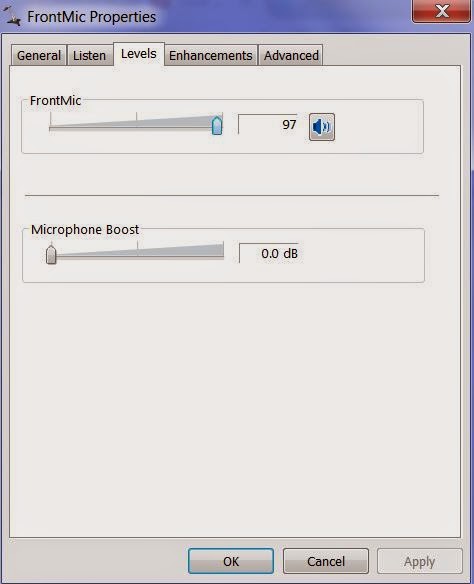
Step 8. Go to the "Levels" tab and check that your microphone boost is at "0.0 dB" and your regular microphone level is at "100".

Step 9. Go to the "Enhancements" tab and make sure "DC Offset Cancelation" and "Noise Suppression" are both ticked.

Step 10. Click OK and you should be done!
Thursday, May 15, 2014

Youtube capture: not enough disk space


My iphone youtube capture app shoed "not enough disk space". Even I deleted some videos, the
same error message still showed. I pushed the top power button for 3 seconds and restart  iphone.
The problem is fixed when iPhone powered back.

Wednesday, May 14, 2014

add comment to table columns in phpMyAdmin


To  add comment to table columns in phpMyAdmin,
click table in phpMyadmin, click column name, click change under action, add comment.

Tuesday, May 13, 2014

git svn conversion


git svn conversion reference:
http://john.albin.net/git/convert-subversion-to-git
http://john.albin.net/git/git-svn-migrate

Monday, May 12, 2014

Monitor Apache, PHP and MySQL in Ubuntu


1) Check if apache is running in Ubuntu
ps aux|grep apache
sudo service apache restart
 check apache port status (port 80)
sudo netstat -nap |grep apache
2) Check if mysql is running in Ubuntu
ps aux|grep mysql
sudo service mysql  restart

connect to mysql
mysql -uroot -p
 check mysql port status  (port 3306)
netstat -nap |grep mysql
3) Check php
php --version
php --info

4) email server exim
ps aux|grep exim
sudo service exim4 restart
 check if exim port is listening (port 25)
sudo netstat -nap |grep exim
All these four log files are located in /var/log/ 

5) Install webmin for further monitoring